Employee Self-Service Portalfor UAE Businesses
Give employees a mobile-ready portal to clock in, apply for leave, view balances and download payslips — on any device. Cut routine HR requests and keep your team self-sufficient.
A Complete Employee Self-Service Portal
Give employees 24/7 access to manage their own HR tasks, reducing repetitive admin on your HR team.
- Submit leave requests and track approvals from any device.
- View and download monthly payslips with full salary breakdowns.
- Clock in/out and view their own attendance history and worked hours.
- Update their own contact details safely (mobile, personal email, address) — with limits that protect sensitive data.
- Access employment contracts, certificates and documents securely.
Personal Information
Mobile Clock-In
Clock In and Out from Your Phone — with Photo & Location
Employees clock in and out directly from their phones, with photo capture and geo-location at check-in to keep attendance accurate. Each person can see their own attendance history and worked hours.
- Photo + geo at check-in: location and a photo are captured at the moment of punch — confirming who clocked in and where.
- Optional geofence: accept clock-ins only when the employee is inside the radius of a company location.
- Own attendance history: employees view their clock-in/out records and worked hours.
- Works offline: punches are saved and sync automatically when connectivity returns.
- Installable web app (PWA): works on mobile without a separate native app — add it to the home screen.
Monthly Attendance Trend
View allYour HR at a Glance
HRX360's ESS dashboard provides a personalized workspace where employees can view all their HR information, track activities, and take actions instantly.
- Visual attendance charts showing daily clock-in/out times and monthly trends.
- Alerts for leave approvals, payroll updates, and document expiries.
- View remaining leave entitlements by type with history and upcoming holidays.
- Download current and previous payslips with detailed salary components.
Apply for Leave and Track It in Real Time
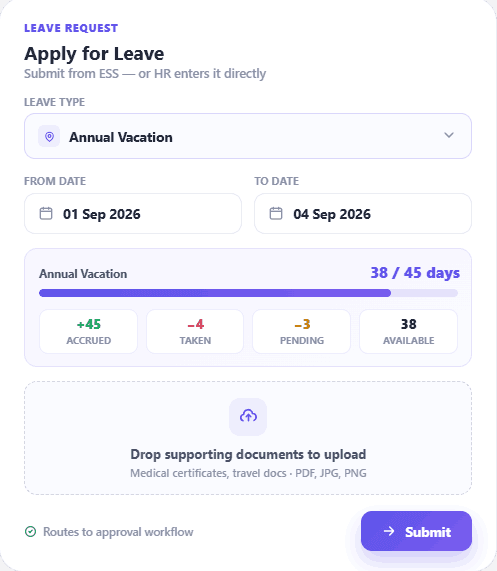
Leave — annual, sick, emergency, maternity and unpaid — can be applied for from the phone, with live status tracking and visible leave balances.
- Apply for any leave type (annual, sick, emergency, maternity, unpaid) from any device.
- See live leave balances by type before applying.
- Track approval status live; get notified when a manager approves or declines.
- Team leave calendar — see who's off before planning.
- Access full leave history with downloadable records.
Payslip
Apr 2026
Payslips and Documents, Anytime
Employees get instant access to their payroll and employment documents through a secure self-service portal — no waiting on HR.
- Download current and historical payslips with salary, allowances and deductions.
- Access historical payslips for loan applications and visa processing.
- Store and view employment contracts, certificates and visa documents.
- Secured with encryption, secure authentication, role-based access and per-company data isolation.
Company-Wide Announcements: See Who Has Read Every Notice
A message in the staff WhatsApp group tells you nothing about who saw it. In HRX360, HR posts a notice once, every employee it is meant for sees it in their portal, and HR can see name by name who has read it.
- Send it to the right people. Address a notice to everyone, or to chosen departments and locations.
- Hard to miss. It appears on the Home page and under a bell with an unread count, with an optional one-time email.
- Proof it was read. See "8 of 12 read" at a glance, then the list of who opened it and when.
- Publish now or schedule. Pin important notices to the top, attach a file, or let AI draft the message from one line.
Announcements
1All offices will be closed on 2 and 3 December. Normal hours resume on 4 December.
Company Files
Stop emailing the handbook
Keep the handbook, policies and forms in Company Files. Share each folder with all employees, with chosen departments or locations, or keep it internal to HR. Replace a file and everyone, new joiners included, opens the current version from their own portal.
Birthdays and work anniversaries, remembered
Switch on automatic greeting emails and HRX360 sends each employee a birthday or work-anniversary message in your own words. A small touch that no one in HR has to remember.
Empower Your Team with HRX360 ESS Portal
A comprehensive employee self-service platform that cuts routine HR requests, improves employee experience, and gives your team 24/7 access to critical HR information.
Digital Leave Applications
Submit leave requests in seconds with automatic manager routing, live approval tracking, and instant balance updates. Eliminate paper forms and email approvals completely.
Live Attendance Dashboard
Monitor daily clock-in/out times with visual attendance trends, monthly summaries, overtime tracking, and late-arrival flags for complete work-hour transparency.
Secure Payslip Access
Download current and historical payslips instantly with detailed salary breakdowns, deductions, allowances, and year-to-date earnings. Available 24/7 from any device.
Document Library
Access employment documents including contracts, certificates, insurance cards, and visa documents in one secure location without HR assistance.
Personalized Dashboard
Centralized employee workspace displaying leave balances, attendance summaries, upcoming holidays, pending approvals, and important company announcements in one view.
Smart Notifications
Email and in-app alerts for leave approvals, payroll updates and document expiry — so employees never miss what matters.
Built for UAE Labour Law
Built around UAE Labour Law requirements — leave entitlements, working hours and overtime.
Company-Wide Announcements
Company notices on the Home page and under a bell with an unread count. HR sees who has read each one.
Company Files
The handbook, policies and forms your company shares, always the current version.
Mobile-Ready, Installable App
Installable, mobile-ready web app (PWA) — works on phones, tablets and desktops; add it to the home screen.
My Onboarding Tasks
New joiners see their onboarding tasks under Home with due dates and the documents to read, and tick them off as they go. Managers see their tasks for each new joiner on the same page.
Learn morePerformance Self-Assessment
Rate yourself on each competency, add comments and goals, save a draft and submit from the app. See the manager’s ratings once shared and acknowledge the review.
Learn moreSecure Access & Data Protection
Encryption, secure authentication, role-based access and per-company data isolation keep employee data protected.
Frequently Asked Questions
Everything you need to know about HRX360 ESS Portal
What is an Employee Self-Service (ESS) Portal?
An Employee Self-Service (ESS) Portal is a secure digital platform that enables employees to manage their HR-related tasks independently. With HRX360's ESS portal, employees can clock in, submit leave requests, view payslips, track attendance, and access personal documents from anywhere, anytime.
How secure is the HRX360 ESS portal?
HRX360's ESS uses encryption, secure authentication and role-based access; each employee sees only their own data, with data isolated per company.
Can employees access the ESS portal on mobile devices?
Yes — it's an installable, mobile-ready web app (PWA) that works on phones, tablets and desktops. Employees can add it to their home screen; no separate native app needed.
How does ESS reduce HR administrative workload?
Employees handle routine tasks themselves — leave requests, payslip downloads, clock-in, contact updates — cutting repetitive HR admin so your HR team can focus on higher-value work.
What features are available in the HRX360 ESS portal?
The HRX360 ESS portal includes mobile clock-in (with photo and geo at punch), leave management (submit and track requests, view live balances), payroll access (download payslips with salary breakdowns), secure document access, a personalised dashboard, profile self-update, and email and in-app notifications.
Can employees clock in from the ESS app?
Yes. Employees clock in and out from their phones, with a photo and geo-location captured at check-in to keep attendance accurate. They can also view their own attendance history and worked hours.
Can employees apply for leave and see their balance?
Yes. Employees apply for leave (annual, sick, emergency, maternity, unpaid) from any device, see their live leave balances by type, and track approval status in real time.
Can employees update their own details?
Yes — employees can safely update contact details like mobile, personal email and address, with limits that protect sensitive data.
Can we send company announcements through the ESS portal?
Yes. HR writes an announcement once and addresses it to everyone or to chosen departments and locations. Employees see it on their Home page and under a bell that shows how many they have not read, with an optional one-time email. HR sees how many employees have read it and a list of who, with the time each one opened it.
Can employees open the company handbook and policies in the portal?
Yes. Under Company Files, employees open the handbook, policies and forms the company shares with them. Each folder is shared with all employees, with chosen departments or locations, or kept internal to HR. When HR replaces a file, employees get the current version.
Ready to Transform Your Employee Experience?
Empower your employees to work smarter and give your HR team the freedom to focus on what truly matters – strategic growth.
See how HRX360 transforms workforce management