Leave Management Software UAE for Accrual, Approvals & Carry-Forward
Streamline leave requests, automate accrual and approvals, and handle year-end carry-forward in one cloud platform. A complete leave management system for UAE businesses, trusted across multiple industries.
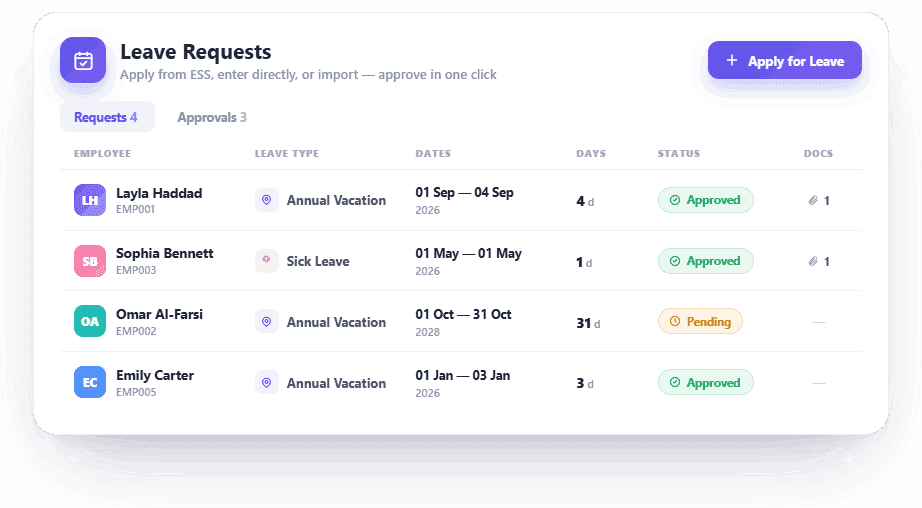
Streamlined Leave Requests and Approvals
Make managing employee leaves simple with an intuitive leave request and approval workflow.
- Employees submit leave requests effortlessly via the Employee Self-Service (ESS) portal.
- Managers approve or decline requests with just a click.
- Reduce administrative tasks with automated leave approval workflows.
- Instant notifications keep employees informed about leave updates.
- Ensure full visibility into leave approval statuses at every stage.
Approval Matrix
Annual Leave · 5 days · Priya Sharma
Flexible Leave Approval Workflows
Route leave the way your business works — a single line-manager approval, or a multi-level approval matrix for teams that need more than one sign-off. Optional reminders and auto-approval keep requests moving.
- Line Manager routing for simple, single-approval teams.
- Multi-level Approval Matrix — configurable approval chains, with fallback to the reporting manager.
- Approval reminder emails re-prompt the current approver on a set cadence (skips weekends/holidays).
- Auto-approve long-pending requests beyond a day threshold (requests needing a document are never auto-approved).
Leave Accrues Automatically, Every Month
Choose the accrual model that fits how you run payroll — both are pro-rata and run on their own.
- Attendance-driven (default): accrual calculates leave based on committed attendance and actual days worked — aligned with common GCC leave accrual practices.
- Calendar-driven: a monthly run accrues a flat 1/12 of annual entitlement per employee, independent of payroll state — ideal for SMEs with irregular payroll timing.
- Pro-rata aware, honouring joining and leaving dates.
Leave Accrual
Leave Type Configuration
Annual Leave
Configure Leave Policies for UAE Companies
Define each leave type with the entitlement, carry-forward, notice and booking rules your policy needs.
- Set max days, carry-forward caps (days or %), notice and advance booking limits per leave type.
- Apply probation rules, unpaid flags and full-entitlement options.
- Configure UAE-standard entitlements (e.g. 30 days annual leave) — fully editable.
- Auto-calculate working days, excluding weekends and holidays (configurable weekend days + holiday calendar).
- Attach documents to applications (e.g. medical certificate for sick leave).
Close the Leave Year Cleanly
At year-end, HRX360 computes closing balances, carries over unused days (capped by days or %), forfeits the excess, and opens the next financial year — with a dry-run option before you commit.
- Automatic closing-balance calculation per employee and type.
- Carry-forward capped by your policy (days or %); excess forfeited.
- Opens next financial year balances in one audited step.
Leave Year-End Close
FY 2025 → FY 2026 · Priya Sharma
Manage Every Leave Type — Including UAE/GCC Presets
HRX360 ships with preset leave templates you can enable and customise, plus custom leave types you can create and manage.
Annual Leave
Configure UAE-standard entitlement (e.g. 30 days per year) — fully editable.
Sick Leave
With medical-certificate attachment and balance tracking.
Maternity & Paternity Leave
Configurable per your company policy.
Hajj & Umrah Leave
Preset templates for UAE/GCC workforces.
Compassionate / Emergency Leave
Quick-approval leave types for urgent situations.
Unpaid & Compensation Leave
With automatic payroll adjustment.
Custom Leave Types
Beyond the presets, create any leave type your business needs — each with its own accrual, carry-forward, notice, probation and approval rules.
Seamless Integration with Payroll
Ensure payroll accuracy with automated leave data integration, seamless adjustment of salary deductions, and accurate end-of-service settlements based on up-to-date attendance and leave balances.
- Automatically sync leave balances with payroll calculations.
- Adjust salary deductions for unpaid leaves automatically.
- Ensure accurate end-of-service settlements based on leave balances — try the UAE gratuity calculator.
Leave → Payroll
April 2026
Team Leave Calendar
April 2026
Live Leave Balances & Team Leave Calendar
Keep balances always up to date, and let teams see who's off before they plan. A shared leave calendar (calendar or list view, with filters) shows approved and pending time off.
- Live leave balances per employee and type, with full ledger history.
- Team leave calendar — see colleagues' approved/pending leave to avoid clashes.
- Prevent overlapping requests; view applied/approved/remaining at a glance.
- Department-wise leave analysis for workforce planning.
Comprehensive Leave Reports for Better Decisions
Make informed decisions with detailed leave analytics and reporting. Track leave patterns, balances, and compliance effortlessly
Leave Detail Report
Detailed breakdown of individual leave applications with approval status and history.
Leave Summary Report
Cross-tab summary of leaves by employee and type for quick insights.
Leave Ledger Report
Complete ledger of leave transactions and balances for audit trails.
Leave Balance Report
Live leave balance status for all employees, exportable to Excel.
Leaves-Expiring Report
Flags leave at risk of forfeiture before year-end so nothing is lost.
Leave Summary Report
April 2026
Powerful Leave Insights at Your Fingertips
Access comprehensive leave tracking and balance reports to monitor leave patterns, support compliance reviews, and make data-driven workforce decisions.
- Generate leave reports by department, role, or time period.
- Track individual leave applications with complete audit trails.
- Monitor live leave balances across your organization.
- Identify trends and leave patterns for better workforce planning.
- Export detailed reports to Excel, and dive deeper in Reports & Analytics.
- Flag leave at risk of forfeiture with the Leaves-Expiring report.
Your Leave Management Questions Answered
Get answers to common questions about HRX360 Leave Management Software
Q:How does HRX360 ensure UAE labour law compliance?
HRX360 is built around UAE Labour Law leave requirements — configure entitlements, sick leave, maternity/paternity leave, weekends, holidays and approval rules based on your company policy.
Q:Can employees access their leave information remotely?
Yes. Employees can access the Employee Self-Service (ESS) portal from anywhere, anytime to submit leave requests, check leave balances, view approval status, and download leave history. The portal is accessible via web browsers and mobile devices.
Q:How does leave data integrate with payroll?
HRX360 automatically syncs leave data with the payroll module. Approved leaves, unpaid leave deductions, and leave encashment are reflected in monthly payroll calculations, ensuring accuracy and eliminating manual data entry errors.
Q:Can we customise leave types and policies?
Yes — create any leave type you need (annual, sick, maternity, Hajj, Umrah, unpaid, compensation and more) with accrual, carry-forward, notice, probation and approval rules. HRX360 ships with preset templates you can enable and edit.
Q:What types of leave reports can I generate?
HRX360 offers comprehensive leave reporting including Leave Detail Report (individual applications), Leave Summary Report (cross-tab by employee and type), Leave Ledger Report (complete transaction history), Leave Balance Report (live balance status), and a Leaves-Expiring Report (leave at risk of forfeiture). All reports export to Excel.
Q:Is training provided for the leave management system?
Yes. We provide comprehensive onboarding and training for your HR team and employees. Our support team is available to help you configure leave policies, set up approval workflows, and ensure smooth adoption across your organization.
Q:How does leave accrual work in HRX360?
Leave accrues automatically each month, pro-rata. Choose attendance-driven accrual based on committed attendance and days worked, or calendar-driven accrual based on a flat 1/12 of annual entitlement each month.
Q:Can leave approvals be multi-level?
Yes. Route leave to a single line manager, or use a multi-level approval matrix. Optional reminders and auto-approval of long-pending requests keep things moving.
Q:What happens to unused leave at year-end?
HRX360's year-end close carries forward unused days (capped by days or %), forfeits the excess, and opens next year's balances — with a dry-run before you commit.
Still have questions? We're here to help!
Book a DemoSimplify Employee Leave Management with HRX360
Eliminate manual leave tracking, reduce administrative workloads, and keep leave aligned with UAE Labour Law requirements using HRX360 Leave Management.