Employee self-service
Employees view their information, update their contact details and emergency contacts, and submit document renewals for HR review when uploads are switched on.
Explore employee self-serviceKeep employee details, documents and job history in one connected record. Add new employees, manage promotions and transfers, and track visa and Emirates ID expiry, with records connected to leave, attendance and payroll.
From AED 6 per employee/month · No implementation fees · UAE-based support team
Employee management software stores employee information and helps HR manage joining details, job changes, documents and leaving records. It gives each employee one current profile, with their employment history and related information in the same system.
HRX360 is built for UAE businesses, with personal, employment, organisational, dependant and insurance records, plus expiry reminders for visas, Emirates IDs, labour cards and passports. Each employee record connects to leave, attendance, employee self-service and payroll within HRX360.
Ask HRX360 AI Intelligence answers workforce questions, such as “Who joined this month?”, using records you have permission to access.
Search, filter, import and update employee records from one central directory, without maintaining separate files or spreadsheets.


Keep personal, organisational, employment, attendance, job-history, work-experience, dependant and insurance information in one structured employee profile.
Create an employee profile with personal, employment and organisational details, or import your existing workforce using an Excel template. After saving a new employee, start an onboarding checklist with task owners and due dates.


Record every promotion, transfer and contract change with automatic change-type detection. Apply changes immediately or schedule them for a future date, and optionally route them through your approval matrix. Every change is kept in a complete, audit-ready job history per employee.
Search and explore your reporting structure through an interactive organisation chart. Expand or collapse teams, view the structure as of any date, and manage reporting lines from one place.

Centralise UAE employee documents and receive reminders before expiry dates, helping HR stay ahead of renewals.

The same employee record supports leave, attendance, payroll, self-service and leaving processes. Details from hired candidates carry into a pre-filled employee record.
Employees view their information, update their contact details and emergency contacts, and submit document renewals for HR review when uploads are switched on.
Explore employee self-serviceUse the same employee record across leave, attendance and payroll processes, so balances, punches and pay runs read one set of details.
Explore payrollTrack exit reasons, last working days, notice periods, and clearance and settlement status. Saving a leaver sets the date of leaving and the last payroll month.
Issue company property such as laptops, phones and cars to an employee from the Assets tab on their profile, recording the issue date, condition and expected return.
Explore asset trackingSalary certificates, employment letters and NOCs are generated from the current employee details on your letterhead, numbered and verifiable by HR.
Explore HR lettersWhen a candidate is hired in the applicant tracking system, Create Employee opens with their name, contact details, nationality and the job’s department, designation and location filled in.
Explore the ATS
Review employee information and workforce trends, including turnover by department, exit type and reason. Filter and export reports for management reviews.
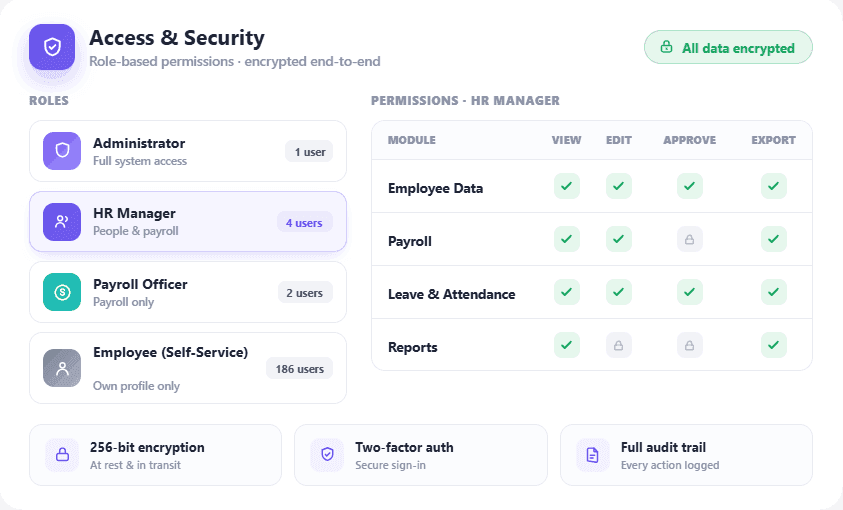
Role-based permissions help you control access to employee information and the actions each user can perform.
Get answers to common questions about HRX360 Employee Management Software
The right fit is the system that holds your employee records and connects them to the processes around them: onboarding, job changes, documents with UAE expiry tracking, approvals and payroll. HRX360 is built for that in the UAE, with visa, Emirates ID and labour-card reminders, employee self-service and WPS-ready payroll from the same records. Shortlist two or three providers and run the same scenario in each demo.
Yes. Record promotions, transfers and contract changes with automatic change-type detection, optional approval routing, future-dating, and a complete, audit-ready job history per employee.
Yes. Store employee documents with issue and expiry dates, including visas, Emirates IDs, labour cards, passports and certificates, with automatic expiry reminders and a configurable renewal responsibility.
Yes. Add your own custom fields to employee profiles to match how your business runs, with no developers needed.
Yes. Import and Export on the employee list brings in many employees at once from an Excel file using the HRX360 template, and salaries can be uploaded the same way for salary setup. Our team helps with the first import during implementation.
In the employee app, employees can update the contact details your company allows, such as phone and email, and add or change their emergency contacts. With employee uploads switched on, they can also submit document renewals, which are held as pending until HR approves them. Job, salary and official details stay with HR.
Yes. A leaver record holds the resignation and last working dates, exit type and reason, notice period, and clearance and settlement status, with an exit-interview and rehire-eligible flag. Saving it marks the employee inactive, sets their date of leaving and fixes the last payroll month, so the leaver drops out of regular payroll after that month.
Most businesses can start quickly by adding employees individually or bulk-importing staff through validated Excel templates. HRX360 also supports employee profile setup, documents, contacts and payroll details in one place.
Beyond records, HRX360 adds job changes and history, the org chart, document and visa expiry tracking, leaver records, employee self-service with Ask HRX360, asset assignment, turnover analytics and payroll sync, plus hiring, onboarding checklists and performance reviews filed against the same employee record.
In a 30-minute demo, explore an employee profile, record a job change, check document expiry and see how the information connects to everyday HR.