Ask HRX360 AI · AI HR Software

AI HR Software for UAE Businesses

Ask your HR data. Get the answer.

Ask about your workforce in plain language. AI Intelligence returns figures, tables or charts from your company's HR records, within your access, with a short explanation.

HRX360 | AI HR Software

What is AI HR software?

AI HR software uses artificial intelligence to help teams find information, complete supported tasks and review documents within their HR system. HRX360 combines workforce questions, employee self-service, AI applicant evaluation and writing assistance with its UAE HR and payroll platform.

HRX360 is UAE HR and payroll software that brings AI into workforce questions, employee self-service in the employee app, applicant evaluation in hiring and everyday writing tasks such as job descriptions. Ask HRX360 also provides guidance on using the software.

Request a Demo
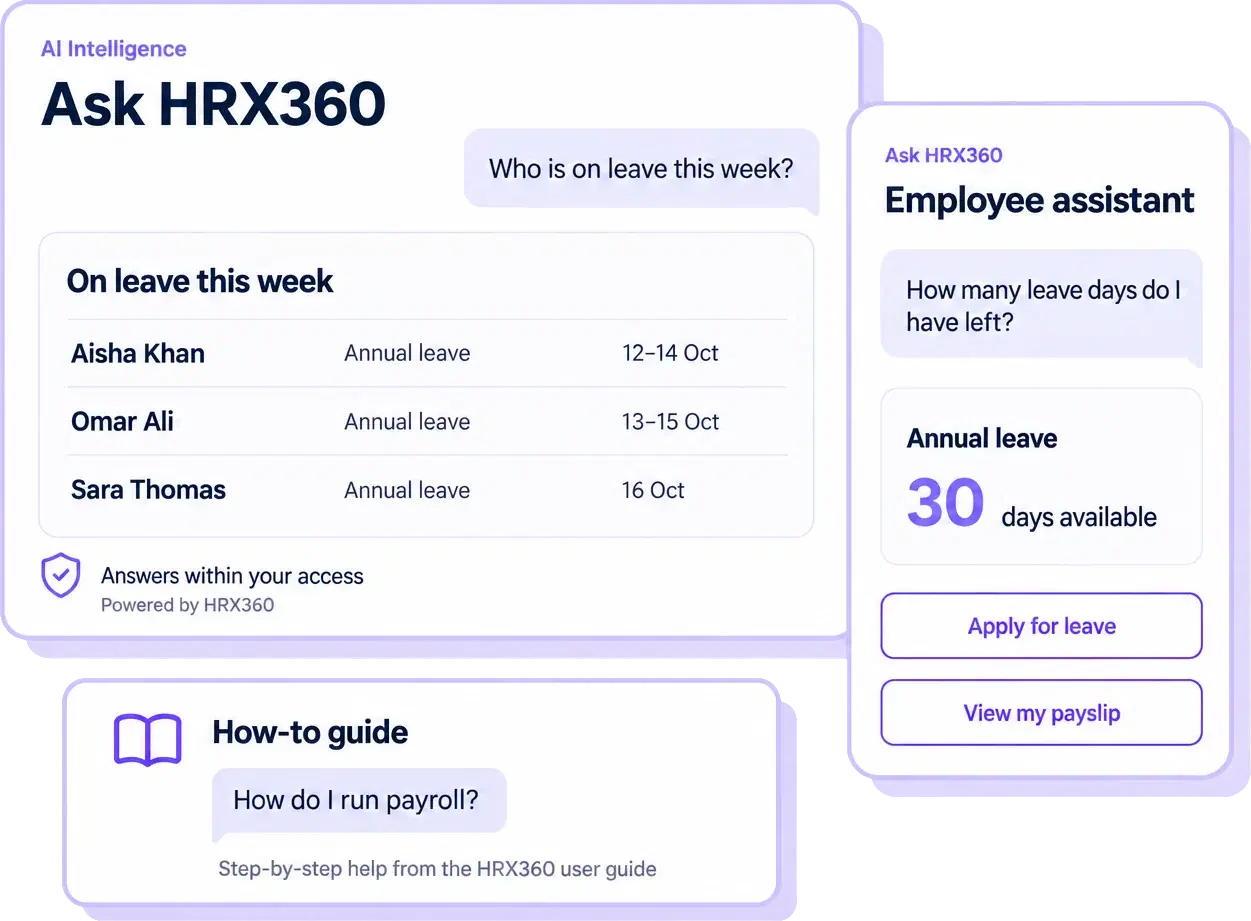
HRX360 AI Intelligence showing employees on leave, an employee assistant displaying leave balance, and payroll how-to guidance
AI Intelligence answers from company records; the employee assistant handles personal balances and supported requests; the how-to guide explains HRX360.
How it works

How HRX360 answers from your own data

  1. 1

    Ask in plain words

    "Who is absent today?" "Where are we on Emiratisation?" "Which visas expire in 60 days?"

  2. 2

    HRX360 reads your records

    HRX360 retrieves the relevant records after checking your access.

  3. 3

    See figures from your records

    A figure, a table or a chart built from the result, with the AI’s short reading of it: the key point, then a practical note.

  4. 4

    Decide, then act in HRX360

    AI Intelligence is read-only. Review the answer and open the relevant HRX360 screen to take action.

AI Intelligence

The questions HR gets asked every week, answered from your records

Four areas today. Payroll, salaries, benefits and assets are not answered yet; the AI names the screen to open instead.

People

Workforce intelligence

Headcount by department, location, nationality or any two-way split. Joiners, leavers and turnover for a period. Tenure and age profile. Probation ending this month. Filtered employee lists.

  • “How many people joined and left this quarter?”
  • “Gender split by department”
  • “Whose probation ends in October?”
UAE

Compliance intelligence

Your Emiratisation share and the gap to a target. Employee documents expiring or missing. Company documents due: trade licence, Ejari, insurance.

  • “What percentage of our skilled workforce are UAE nationals?”
  • “Which visas expire in the next 60 days?”
  • “Who is missing a mandatory document?”
Time

Leave and attendance intelligence

Who is absent or late on a day, with week-offs and holidays reported as such. Attendance rate and absences by department or employee. Who is out, pending leave and how old it is, balances, leave taken by type or month.

  • “Who is absent today?”
  • “Which leave requests have waited more than a week?”
  • “Sick leave by department this year”
Talent

Hiring and onboarding intelligence

The applicant pipeline by stage. Onboarding checklists in progress and overdue tasks. Open HR requests and pending job changes.

  • “How is hiring going?”
  • “Which onboarding tasks are overdue?”
  • “How many HR requests are waiting for approval?”
One AI, across the product

AI in the work, not only in a chat window

The same Ask HRX360 helps employees, screens applicants, drafts text and explains the software.

The employee AI agent

Employees apply for leave, fetch payslips, check attendance and document expiry by chat, on their own data, with a confirm step before anything is submitted.

Explore employee self-service

AI applicant screening

Evaluate CVs against the job’s requirements, with strengths, gaps and interview questions. A guide for sorting; people decide.

Explore AI applicant screening

Draft with AI

One line in, a job description or a company announcement out, ready for your review.

Explore announcements

How-to guide on every screen

Ask how to run payroll or approve leave and get the steps from the user guide. Reads no data, never limited.

Explore HR software UAE

AI-guided setup

Leave types, holidays, pay periods and approval flows configured from a guided setup, so most companies go live in about 30 minutes.

Explore guided setup

School Edition AI reports (schools only)

For schools and nurseries: an inspection-readiness report on the Staff Central Record, CPD register and appraisal cycle.

Explore the School Edition
Security and trust

AI that works inside your permissions

Ask HRX360 never connects to your database. It chooses from read-only questions we built, HRX360 runs them under your permissions, and only the result needed for that one answer is sent to the AI service. Pay data, bank details and documents are never included.

Your data only

Only your company’s records, read at the moment you ask. HRX360 stores no chat history on its servers; each request is sent fresh from your browser.

Your permissions only

An answer can read only the areas the asker’s role already opens with the right to see others. A self-only employee gets a polite refusal and nothing is read.

Numbers straight from the records

Cards, tables and charts are built by HRX360 from the query result, never retyped by the AI. The commentary is marked as the AI’s reading.

The AI never sees your database

It never writes a query. It chooses from read-only questions we built, and HRX360 runs them under your permissions.

Off means off

Switch AI off for the whole company, or only in the employee app. While it is off, nothing is sent to the AI service.

You decide who asks, and how much

A role permission says who may ask, a daily allowance per company keeps use predictable, and every question is in the audit log.

What AI Intelligence does, and does not do

AI Intelligence answers questions from permitted HR records. It does not run payroll, change records, approve requests or answer payroll and salary questions. In the employee app, the assistant can submit supported requests after the employee reviews and confirms them.

Frequently asked questions

AI in HRX360, explained

What it answers, what it refuses, how the numbers are kept honest, and who controls it.

What is AI HR software?

AI HR software is HR software with AI built into it: it answers questions from your own HR records, helps employees complete routine tasks, and reads documents such as CVs for you. In HRX360 the AI works inside the product under each user's own permissions: it never connects to your database, and only the result needed for an answer is sent to the AI service.

What questions can Ask HRX360 AI answer?

Workforce (headcount by any dimension, joiners, leavers, turnover, tenure, probation), Emiratisation (your percentage and the gap to a target), attendance (who is absent or late today, attendance rate by department), leave (who is out, pending requests, balances, leave taken by type), documents (expiring and missing employee documents, company documents due), hiring (pipeline by stage), onboarding (checklists and overdue tasks), open HR requests and job changes.

Can it answer payroll or salary questions?

Not in this phase. It declines payroll, salary, benefits and asset questions and names the screen to open instead. No pay data, bank details, contact details or dates of birth are ever returned.

Are the numbers reliable?

Figures displayed in cards, tables and charts come from HRX360's query results, not from the AI. AI commentary can contain mistakes, and results depend on the underlying records and how the question is interpreted. Check important decisions against the relevant records on the screen it names.

Does the AI see our whole database?

No. AI Intelligence never writes a database query and never sees the database. It chooses from a fixed set of read-only questions we built; HRX360 runs the query on your records and the AI reads the result. It can only use the areas your role can already open with the right to see other employees. The employee assistant is a separate mode: it acts only on the employee’s own data and submits a request only after the employee confirms it.

Who decides who can ask?

You do. An administrator switches Ask HRX360 AI on or off for the whole company; while off, nothing is sent to the AI service. A role permission decides which roles may ask, and each role’s other permissions decide what an answer may read. Each question is recorded in the audit log; answers are not stored.

How many questions do we get?

Data questions are counted for the whole company per day: 3 on Standard, 20 on Professional and 50 on Enterprise, with more available on request. The how-to guide is never limited.

Can employees apply for leave by chat?

Yes. In the employee app, Ask HRX360 works as an agent on the employee’s own data: it checks the dates against your leave rules, shows a summary to confirm, then submits. It can also fetch a payslip, show attendance and report document expiry dates. Nothing is submitted without the employee confirming.

Does HRX360 use AI in hiring?

Yes. When you switch it on, every applicant's CV is compared with the job's requirements and given a match score, with requirements marked met or not, strengths, gaps and interview questions. It never moves or rejects anyone, and it is instructed to ignore name, nationality, gender, age, religion and photo.
Ask your HR data a question, live

A 30-minute demo: we ask “who is absent today?” and “where are we on Emiratisation?” on a UAE-configured account, then show the employee agent and applicant screening.