One grid, every review
Stage, what it is waiting for, reviewer and rating for each employee; filters by stage, department and reviewer.
From Self-Assessment to a Completed Review
Employees complete their self-assessment on their phone. Managers review and share. Employees see the manager's ratings once the review is shared and acknowledge them, with development goals for the next period and every appraisal kept on the record.
Performance management software helps businesses organise employee reviews, assess performance, set development goals and track progress. In HRX360 that is a review cycle: the employee completes a self-assessment, the manager reviews and rates, the result is shared, and the employee acknowledges it, with development goals for the next period recorded alongside. It replaces the appraisal forms, Word files and email threads that reviews otherwise live in.
In HRX360 it is part of your HR software: every review is filed against the employee record, the reviewer comes from the reporting line already on it, and the whole thing is done in the employee app.
Request a DemoRates each competency, comments, adds goals, saves a draft and submits from the app.
Sees the self-assessment, rates, writes a summary, agrees goals and shares.
Sees the manager’s ratings and the overall rating once the review is shared.
Acknowledges with an optional comment and the date recorded. HR closes the cycle and the review stays on the record.
Self-assessment in the app, manager review on the same screen, every competency rated before anyone can submit. No Word files to chase.
Each side is hidden until it is handed over. The overall rating comes from the reviewer’s ratings only, on one scale for everyone, weighted if you choose.
Start Cycle gives every active employee a review with their reporting manager. Add new joiners mid-cycle. The cycle strip shows self-assessments in, shared, completed and who has no reviewer yet.
Goals with progress notes from both sides, acknowledgement with a date, and closed cycles kept read-only against the employee record.
The manager sees the self-assessment only after the employee submits it. The employee sees the manager's ratings and the overall rating only after the manager shares them. HR users with the Performance permission can open any review at any stage.
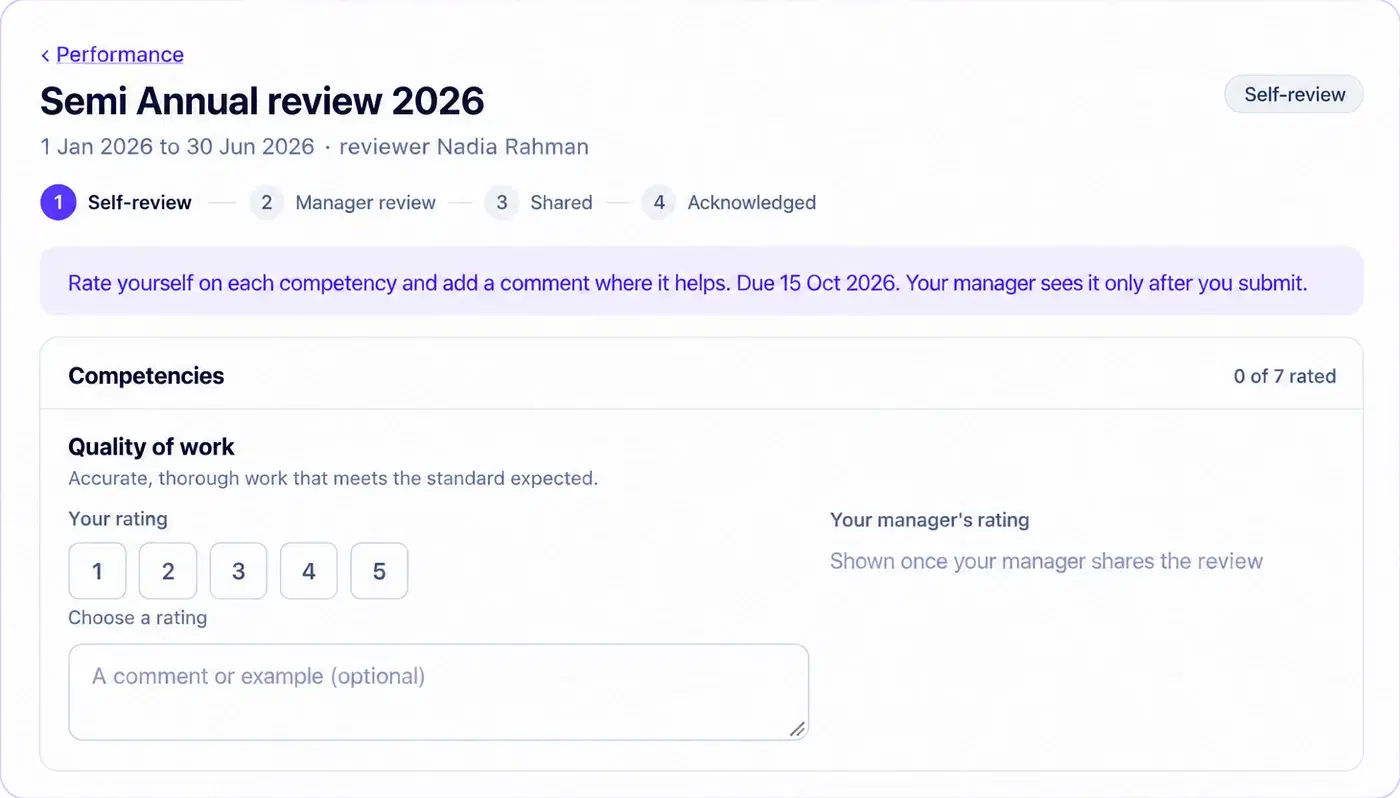
Name the cycle, set the period and the deadlines, and start it. Every active employee who joined by the end of the period gets a review, with their reporting manager as reviewer. HR follows the whole thing from one grid.
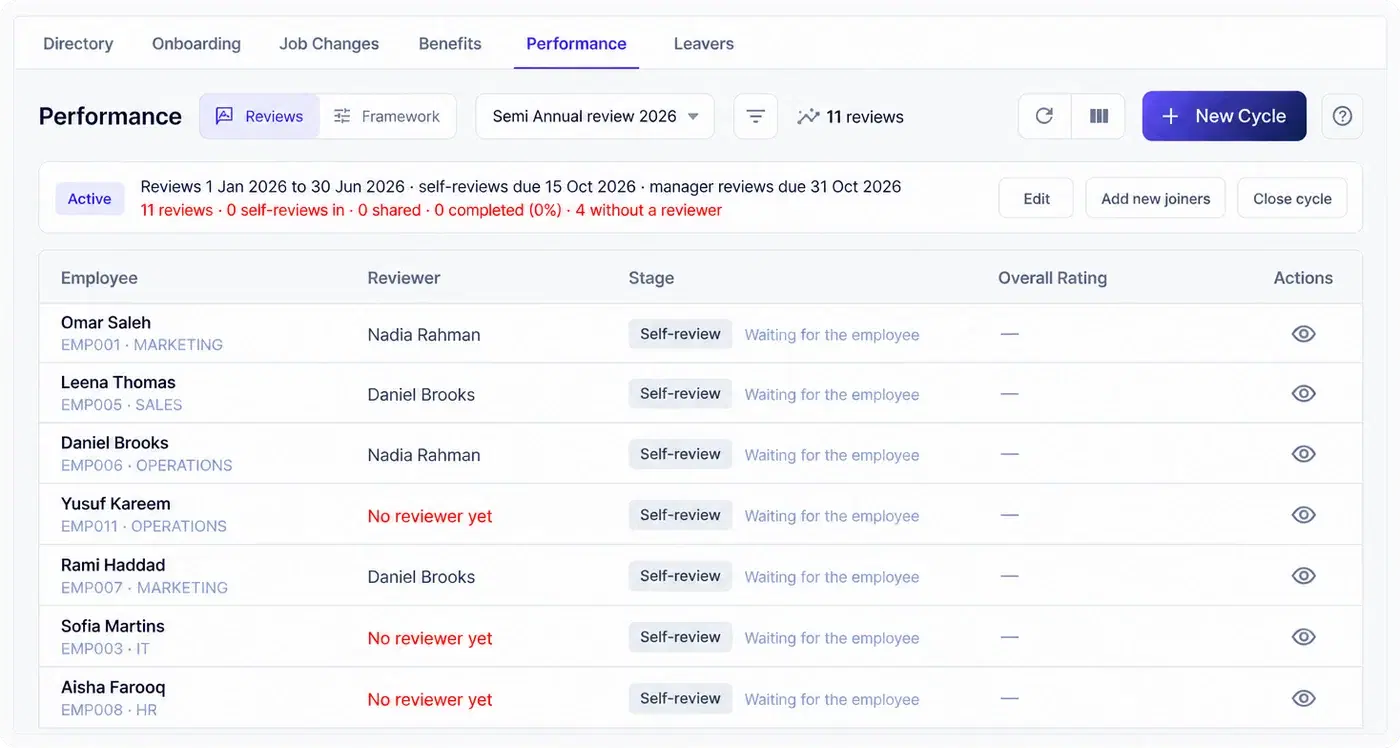
Stage, what it is waiting for, reviewer and rating for each employee; filters by stage, department and reviewer.
Open any review at any stage. The employee and the reviewer see only what has been handed to them.
A self-assessment submitted too soon goes back to the employee; a shared review goes back to the reviewer.
Give a review to anyone who joined after the start, close the cycle to make it read-only, reopen if needed.
Start with eight competencies: quality of work, productivity, job knowledge, communication, teamwork, reliability, initiative and problem solving, customer focus. Reword them, add your own, weight the ones that matter more. The five-point scale, from Outstanding to Unsatisfactory, keeps its points while you reword each label and meaning.
Change competencies later and past ratings stay on record.
Performance appears in the employee's menu once they have a review to write or read, with a count of what is waiting. Managers get two tabs, My reviews and Team reviews. Save a draft and return later; every competency must be rated before submitting, and the meaning of each point shows as you choose it.
Review changes are recorded in the audit log.
What is included, who sees what, how the rating is worked out, and which plan it comes with.
Review cycles you start for the whole company, an employee self-assessment and a manager review on the same competencies, an overall rating worked out from the manager’s ratings, development goals for the next period, and the employee’s acknowledgement with a date. Competencies, weightings and the rating labels are yours to set. It is part of the HRX360 HR software, so every appraisal is filed against the employee record.
Yes. Performance appears in the employee app when there is a review to write or read. The employee rates each competency, adds comments and goals, can save a draft and return later, and submits from the phone. Managers get My reviews and Team reviews tabs in the same app.
Yes. A new company starts with eight competencies, such as quality of work, communication, teamwork and customer focus, each with a line on what good looks like and an optional weighting. Add your own, reword them or switch off the ones you do not use. The five-point scale keeps its points but you can reword each label and meaning.
Yes. The employee adds their own goals while writing the self-assessment. The reviewer can add, change or remove goals until the review is shared. Afterwards the employee updates progress on each goal and adds a note, and both sides stay on the review.
The reviewer sees the self-assessment only after the employee submits it, and the employee sees the manager’s ratings only after the manager shares them. HR users with the Performance permission can open any review at any stage, change the reviewer or send a review back a stage.
From the reviewer’s ratings only: their average across the competencies, weighted if you set weightings, rounded to the nearest point on the five-point scale. Self-ratings do not count towards it.
That the employee has read the shared review, with the date recorded and an optional comment. It does not mean they agree with every point, and it is not an electronic signature. HR closes the cycle separately once reviews are done.
Performance Reviews is included with the Enterprise plan. Does HRX360 do 360-degree feedback, calibration or OKRs? Not at the moment; the review cycle, competencies, goals and acknowledgement are what is built today.
No. The School Edition has its own teacher appraisal with a KHDA-aligned framework and principal sign-off. Performance Reviews is the general-business review cycle for any company, and a school can run both.
A 30-minute demo: we start a cycle, write a self-assessment on a phone, review and share it as the manager, and show the acknowledged result on the record.