My Onboarding
The employee’s own tasks with due dates, progress, and a link to any document to read.
Who Does What, By When, for Every New Joiner
Manage every new joiner's checklist with assigned owners, due dates and automatic email reminders. HR, managers and employees complete their own tasks, while HR tracks progress in one place, all within HRX360 HR and payroll software.
Employee onboarding software helps businesses organise the tasks involved in welcoming and preparing new employees. It assigns owners, sets due dates, sends reminders and tracks completion, from preparation before joining to follow-ups after the first day.
Part of HRX360 HR software, onboarding checklists connect with employee records, recruitment and employee self-service. HR starts the checklist right after the employee record is saved, or later from Onboarding, and each person sees the tasks assigned to them. When hiring through the applicant tracking system, candidate details carry into a pre-filled employee form for HR to review and save.
Request a DemoThe portal account is created and the welcome email goes out with a set-password link. HRX360 then asks "Start onboarding?".
The start date is filled in from the hire date. Preview the tasks and their due dates, then start.
HR, the manager and the new joiner each see their tasks. Reminders go out at 8 am UAE time for tasks due and once when one is overdue.
When every task is done or skipped the checklist completes. Done tasks stay on record with who did them and when.
The manager, the employee or one of your roles, with a due date counted from the start date. Nothing depends on memory.
Each owner is emailed the tasks due that day at 8 am UAE time, and once more when a task becomes overdue. HR does not chase.
Portal access and the welcome email go out when the record is saved. My Onboarding shows their tasks, with the handbook one tap away.
Hired candidates arrive pre-filled, documents uploaded during onboarding stay on the profile with expiry tracking, and the same app carries on to leave, attendance and payslips.
Start with the standard eight-task list in one click, or build your own. Each task names who does it: the reporting manager, the employee, or any of your company's roles such as IT or HR Assistant. Due days count from the start date, so a task can fall three days before day one, on day one, or a month in.
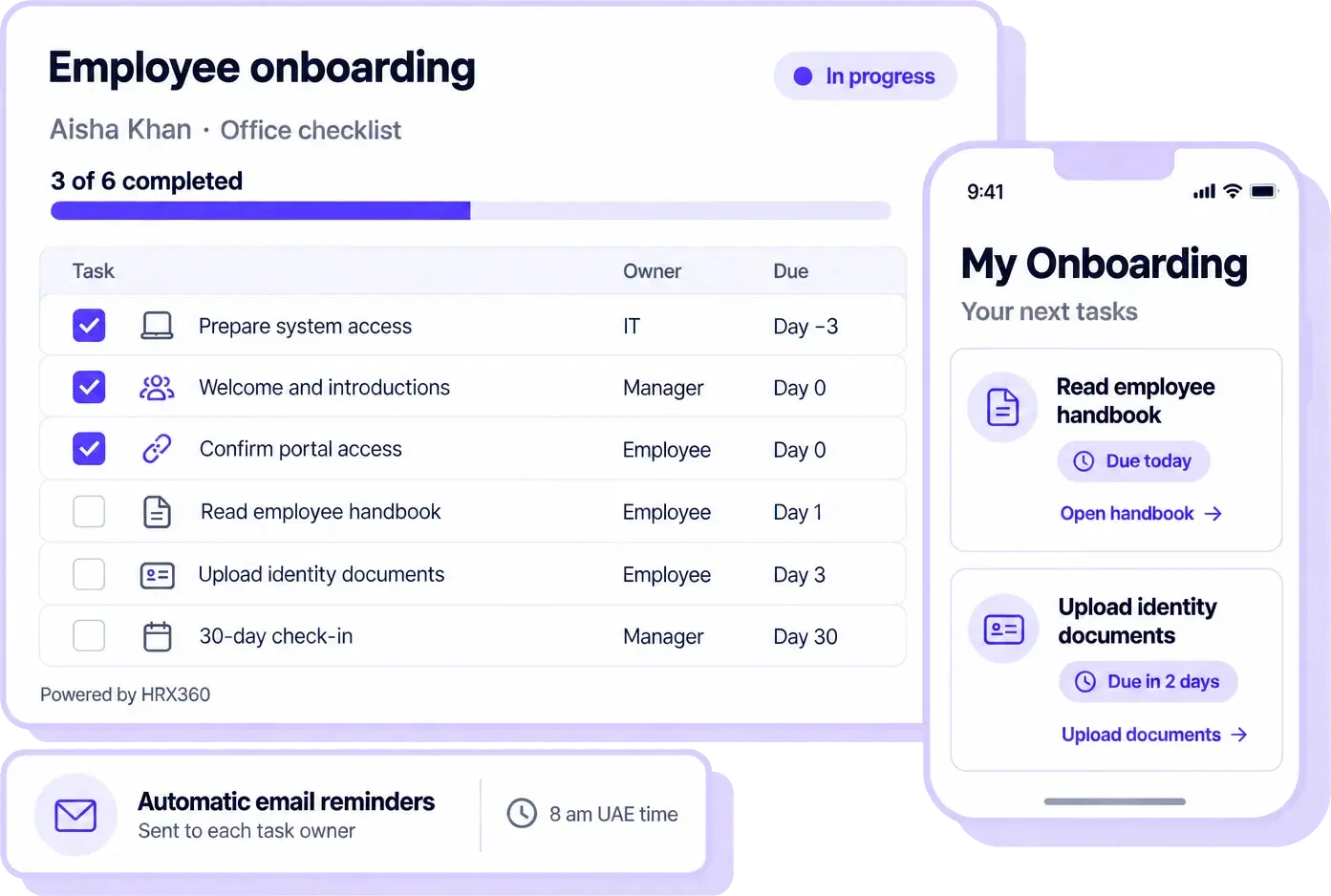
Organise passport and Emirates ID uploads, profile and contract checks, handbook reading, system access and manager introductions in one checklist. Assign each task to the employee, their manager or the responsible company role, with a clear due date.
Use different checklists for office and site employees, with department or location preferences helping HR choose the right template. With employee uploads switched on, documents uploaded through employee self-service go to HR for approval, with expiry tracking on the employee record.
New employees see their assigned tasks in My Onboarding, with due dates and links to documents they need to read. Managers and other task owners see their responsibilities for each new joiner. Automatic email reminders reduce manual follow-ups, while HR tracks overall progress.
The employee’s own tasks with due dates, progress, and a link to any document to read.
"Onboarding tasks for your team" on the Home screen, grouped by the person they are for.
Each owner is emailed the tasks due that day, and once more when a task becomes overdue.
HR sees every checklist in progress, "4 of 8" done, and any overdue count in red.
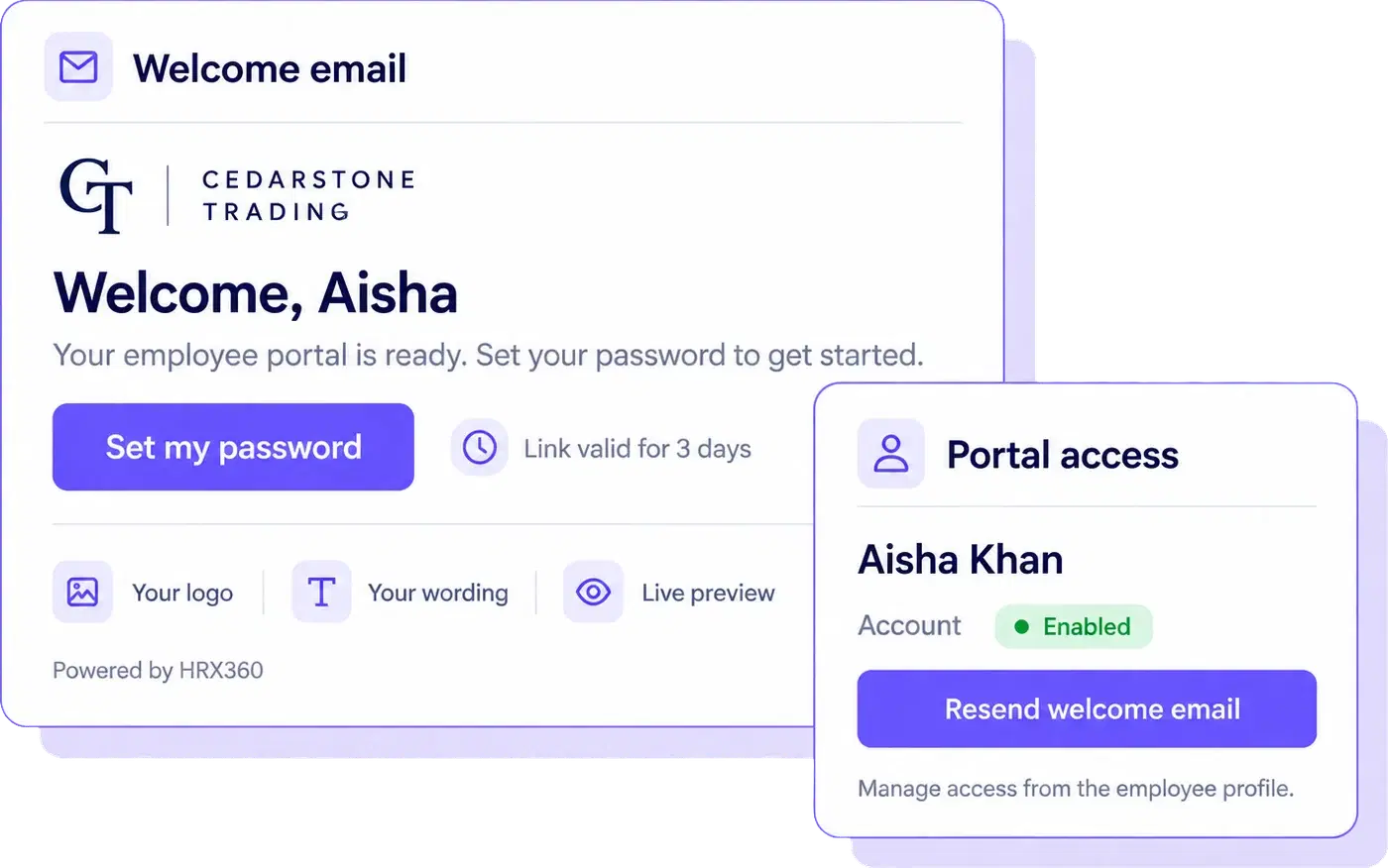
Your logo, your words, their own password. Saving an employee record with an email address creates the portal account and sends a welcome email with a Set my password link that works for three days. No default passwords, no spreadsheet of logins.
When you hire through HRX360, Create Employee opens a form with the candidate's details already filled in. HR reviews and saves the record, then chooses whether to start onboarding. New employees receive their portal access by email and use the same app for onboarding tasks, document uploads, leave, attendance and payslips once published.
See the applicant tracking systemName, contact details, nationality, department, designation and location carried over from the application.
Offered right after the record is saved, with the start date filled from the hire date.
The passport and Emirates ID the new joiner uploads are held for HR approval, then tracked for expiry.
Leave, attendance, payslips, HR requests and announcements in the same employee app.
Common questions about onboarding checklists, task owners, employee access and welcome emails.
Employee onboarding software helps businesses organise the tasks involved in welcoming and preparing new employees: it assigns owners, sets due dates, sends reminders and tracks completion, from preparation before joining to follow-ups after the first day. In HRX360 it is part of the HR software: HR starts the checklist right after the employee record is saved, the new joiner completes their own tasks in the employee app, and reminders go to whoever owns each task.
One click adds a standard list of eight tasks you can edit: email and system access, the welcome message, a profile and contract check, the day-one welcome, the portal account, the handbook, document uploads and a 30-day check-in. You can build your own checklists from scratch, keep several, and point one at a department or location so it is suggested first.
Each task is owned by the employee's reporting manager, the employee, or one of your company's own roles such as Administrator or HR Assistant. Due days are counted from the start date, so a task can fall three days before day one, on day one, or a week after. If an employee has no reporting manager on record, the manager's tasks go to the Administrator role until you reassign them.
Yes. Task due dates are counted from the checklist’s start date, which is filled in from the hire date. You can schedule preparation tasks before day one, such as email and system access, joining-day activities, and follow-ups such as a 30-day check-in.
Yes. Keep several checklists, for example one for office staff and one for site staff, and name a department or location on each so the right one is suggested first. On a started checklist you can reassign tasks, change due dates or add a one-off task without changing the template.
My Onboarding appears in the employee app while they have tasks: their own tasks to tick, each with a due date and a link to any document to read, such as the handbook. They never see what HR or the manager does for them. A manager sees their own tasks for the new joiner on the same page and on the Home screen.
Saving an employee record with an email address creates their portal account and sends a welcome email with a Set my password link that works for three days. There is no default password. HR can resend the email or switch access off from a Portal Access panel on the profile.
Yes. Under Settings you edit the subject, the message above the button and an optional closing note, with placeholders for the first name, company name and start date, a live preview and a test send to yourself. Your company logo heads the email. The set-password button, the three-day notice and the sign-in address are always included.
No. After HR saves the employee record, including one created from a hired candidate, HRX360 offers a "Start onboarding?" prompt. HR selects the checklist, reviews the dates and starts it. Portal-account creation and the welcome email happen separately, when an employee record is saved with an email address.
Employee onboarding checklists are included in the Professional and Enterprise plans. They are not included in Standard.
HRX360 has separate leaver management for employee exits, with the last working day and final payroll date. Offboarding checklists are not currently available in the onboarding module.
See how HRX360 connects employee records, welcome emails and onboarding checklists in a 30-minute demo. We will show how HR assigns tasks, how employees and managers complete them, and how your team tracks progress.