Secure HR & Payroll Data with Roles, Permissions & Audit Logs
Control exactly who sees and does what, log every change with a searchable audit trail, and keep each company's data isolated and secure — so HR and payroll information stays in the right hands.
How does HRX360 keep HR and payroll data secure?
HRX360 protects HR and payroll data with three layers: role-based access control, so each user only sees and does what their role allows (down to the field level); a comprehensive audit log that records every change — who did what, before and after, and when; and secure access with verified sign-in, trusted devices and per-company data isolation. Together they give HR, finance and IT clear control and accountability over sensitive employee and payroll information.
Control Exactly Who Sees and Does What
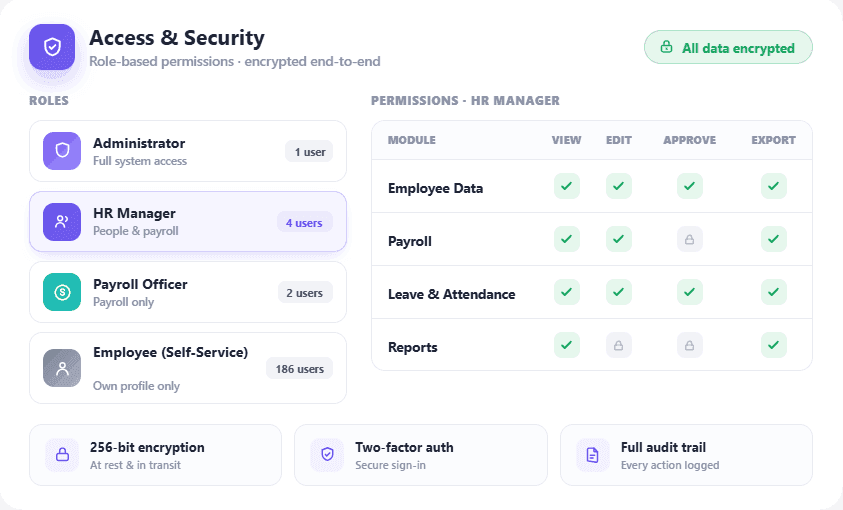
Not everyone should see payroll. Role-based access makes sure they don't.
- Granular roles — create roles with module-level permissions: create, edit, delete, authorise and more.
- Permission gating — features a user has no access to are simply hidden from them.
- Field-level access — sensitive fields like salary can be restricted, not just whole pages.
- Right people, right data — give HR, finance, managers and admins exactly the access they need.
Every Change, Logged and Searchable
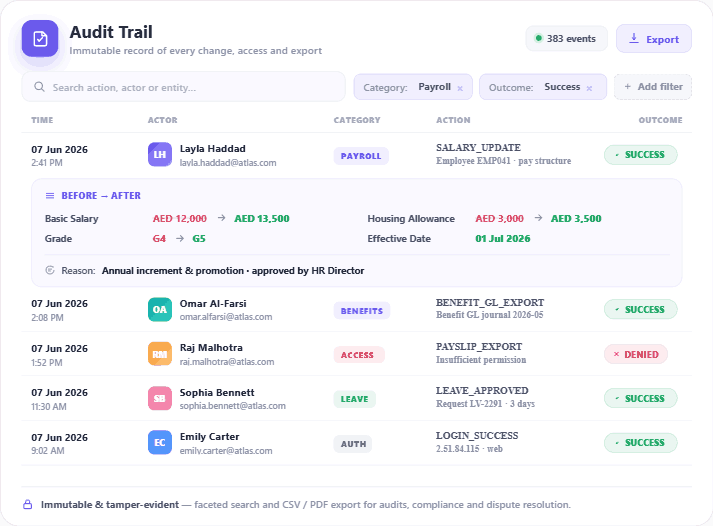
HRX360 keeps a comprehensive audit trail of what happens in the system — the actor, the action, the before-and-after values, the category and the timestamp — with faceted search and export. When a number changes or a question comes up in an audit or dispute, you can see exactly who changed what, and when.
- Full trail — actor, action, before/after, category and timestamp on every change.
- Searchable — faceted search to find the exact event.
- Exportable — for audits, compliance and dispute resolution.
- Accountability — full visibility for finance, HR and management.
Secure Sign-In and Isolated Data
Access is protected with verified sign-in and trusted devices, and every company's data is kept isolated — so your HR and payroll data stays yours.
Verified sign-in
Email verification and secure password handling.
Trusted devices
Recognise the devices your team signs in from.
Data isolation
Per-company isolation keeps your data separate and private.
Encrypted hosting
Encrypted, access-controlled cloud infrastructure.
Built for the People Accountable for the Data
IT / Security
Control access and review the audit trail.
Admins
Set roles and permissions for the whole team.
Compliance / Finance
Export the audit log for reviews and disputes.
Business owners
Confidence that payroll data is in the right hands.
Control and Accountability, Built In
Least-privilege by design
People see only what they need.
Nothing happens off the record
Every change is logged and searchable.
Your data stays yours
Isolated, encrypted and access-controlled.
Security, Roles & Audit — FAQs
How does HRX360 keep HR and payroll data secure?
HRX360 protects HR and payroll data with three layers: role-based access control, so each user only sees and does what their role allows (down to the field level); a comprehensive audit log that records every change — who did what, before and after, and when; and secure access with verified sign-in, trusted devices and per-company data isolation.
Does HRX360 support role-based access control?
Yes. You can create roles with granular, module-level permissions (create, edit, delete, authorise), and features a user can't access are hidden. Sensitive fields can be restricted at field level.
Can I control who sees payroll or salary data?
Yes. Role-based and field-level access let you restrict salary and payroll information to only the roles that should see it.
Does HRX360 keep an audit log?
Yes. Every change is recorded with the actor, action, before/after values, category and timestamp, with faceted search and export for audits and disputes.
Is each company's data kept separate?
Yes. HRX360 uses per-company data isolation so your data is kept separate from other tenants, with verified sign-in and trusted-device support.
Is HR data encrypted?
HRX360 is hosted on secure cloud infrastructure with encrypted storage and strict, role-based access control.
See HRX360's Security in Action
Book a live demo and we'll walk through roles and permissions, the audit log and secure access on a configured test account.